Put your shop in your neighbourhood’s pocket.
Grocery, greengrocer, butcher, bakery, pharmacy or any other local shop: on Sayfa your products and prices show up for people nearby, with the distance to you.
How to register
Get the app and sign in
In the My Business tab, sign in with a passkey, Apple or Google. No passwords.
Register your business
Enter the name, category, address, the spot on the map, phone and opening hours.
Get verified
Enter your tax number (VKN or TCKN) or upload a photo of your tax plate or trade registry document. Verified businesses get a check mark next to their name.
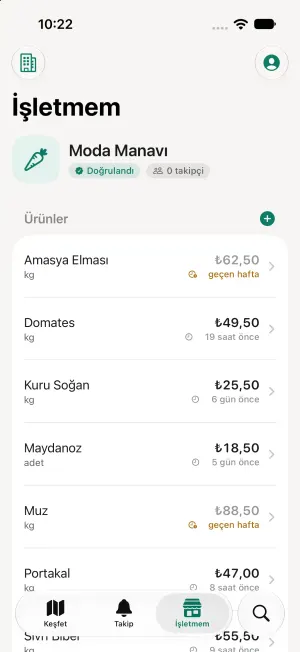
Add products and prices
Take a photo and let the device suggest the product name, category and description. Enter the price and unit (piece, kg, litre, pack…) and publish.
What you get
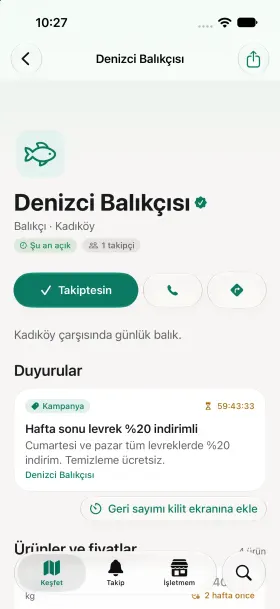
A public page
Your address, opening hours, products and prices at sayfa.app/b/…. Links you share open straight in the app for people who have it.
Price history
Every price change is kept and charted. Confirm an unchanged price with one tap to keep it marked as current.
Announcements and campaigns
New products, discounts, “bread half price after 7 pm”. They reach your followers as notifications, and campaign countdowns show on their Lock Screens.
Found by photo
Your product photos take part in photo search. A clear photo means the person looking for it can find you.
“Price is wrong” reports
Customers tell you when the shelf price differs from the app. Reports close when you update the price.
Followers
Neighbours who follow you never miss an announcement. You see how many people follow you.
No paid ranking.
On Sayfa nobody can pay to rank higher. Results are ordered by distance, relevance to the search and price freshness. Keeping your prices current is the only way to stand out. If there is sponsored content, it is always labeled “Sponsored”.
Why verification?
People should be able to trust that the shop they see exists and is run by the shop itself. Verification documents are not public and are used only for verification.
The apps are coming soon.
The iPhone and Android apps are being prepared for release. To add your business from day one or to ask a question, write to us: